Welcome Message
The general welcome message is the greeting 4C:me shows at the start of a new conversation. Administrators set it once for the whole deployment; an agent's own welcome message takes precedence whenever the selected agent has one.
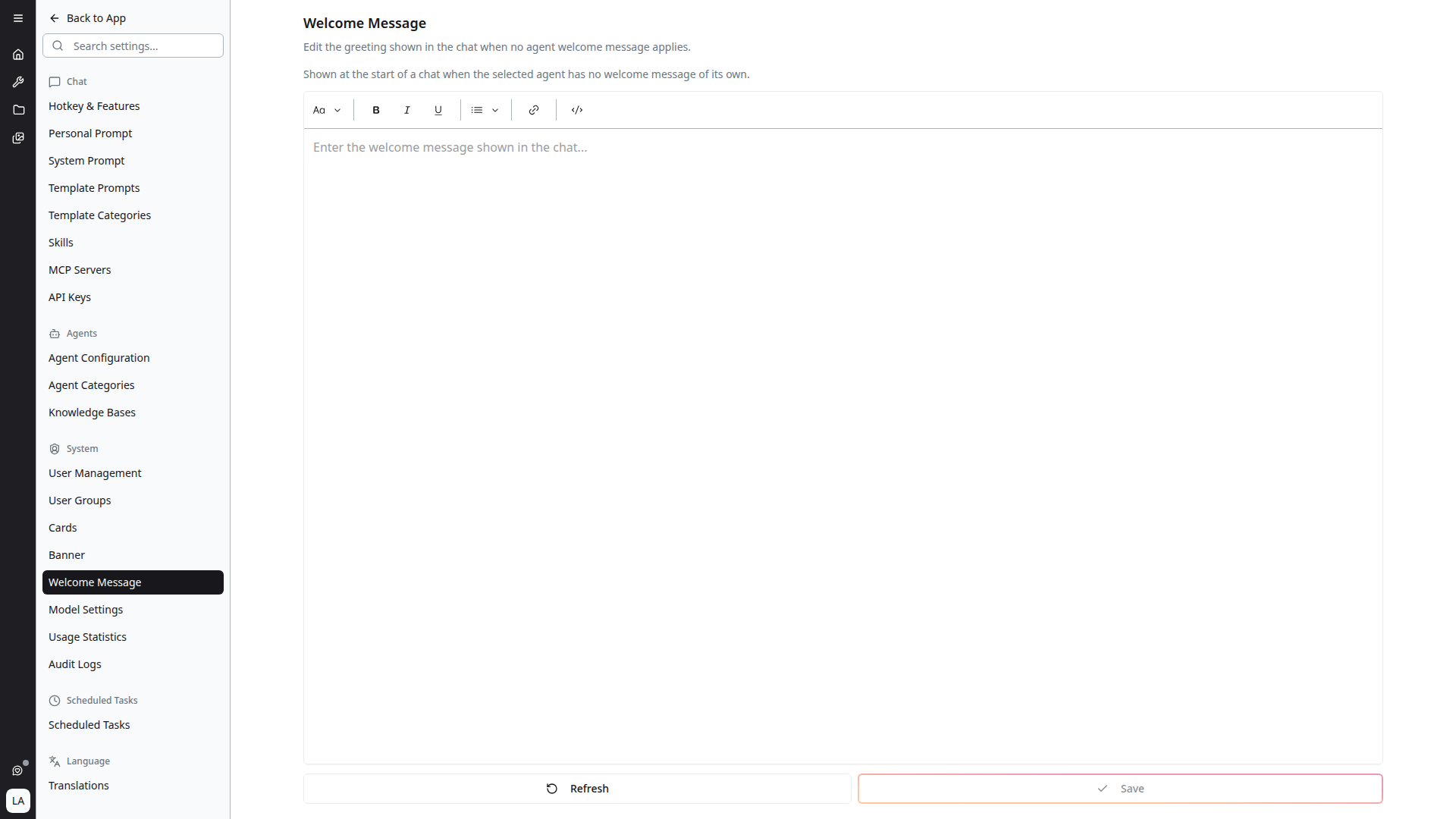
Opening the Setting
Open Settings, scroll to the System section in the sidebar, and click Welcome Message. It requires the system_settings.manage permission; without it the entry is not shown.
Writing the Message
The editor formats text as you write, with the same toolbar the platform uses for agent welcome messages:
- Text styles — normal text or Heading 1–3
- Bold, italic and underline
- Lists — numbered or bulleted
- Link — a URL, optional display text, and whether it opens in a new tab
What you format here is what users see in the chat. There is no length limit.
Editing the HTML Source
The </> button (Edit HTML source) switches the editor to the raw HTML of the message, for markup the toolbar cannot produce. Click it again (Edit as rich text) to return to the formatted view.
The rich-text editor can only hold what its toolbar offers. If switching back would drop part of your markup — a full HTML document, its styles, or elements the editor has no equivalent for — the platform asks first:
Switching will drop part of this markup Stay in the source view to keep it as written.
Choose Stay in source to keep the markup as written, or Switch and drop it to continue in the rich-text editor without it. A message saved as a full HTML document opens straight in the source view, and is shown to users in a sandboxed frame.
Saving
- Save stores the message. It is enabled only once something has changed. Your own open chat picks up the new greeting straight away; other users see it the next time they open the platform.
- Refresh reloads the stored message and discards unsaved edits.
- To remove the greeting, clear the editor and save.
If the stored message cannot be loaded, saving is disabled and the page reads "The saved welcome message could not be loaded, so saving is disabled. Refresh to try again." This prevents an empty editor from overwriting a message that exists.
Where Users See It
The welcome message appears in an empty conversation, in place of the default "How can I help you?":
| Situation | What the empty chat shows |
|---|---|
| No agent selected | The general welcome message |
| Agent selected, with its own welcome message | The agent's welcome message |
| Agent selected, without a welcome message | The general welcome message |
When no general welcome message is set, the empty chat shows the selected agent's description, or "How can I help you?" when there is no agent.